
Crunchbangplusplus 9 tweaks
Crunchbangplusplus 9
Crunchbangplusplus (#!++) has been my workstation distribution of choice ever since Crunchbang (#!) shut down. The original Crunchbang distribution was fairly lightweight and used Openbox. Once it shut down @computermouth created a homage in Crunchbangplusplus.
Crunchbangplusplus 9 is based on Debian 9 Stable (Stretch).
Issues
Crunchbangplusplus 9 shipped with some configuration issues.
- OBApps package missing
- Power Management menu entry mis-configured
- Volume Control keyboard shortcut mis-configured
- Default
new windowbehavior - File Manager image previews disabled
- GIMP font rendering incorrect on white text
OBApps
The right click menu entry for Settings > Openbox > Gui Applications Settings Editor (obapps) fails because it's missing from the installer.
First, we need to install some dependencies.
$ sudo apt install python-wxgtk3.0 python-wxtools python-wxversion python-xlibThen retrieve and install the missing obapps package.
$ wget https://packages.crunchbangplusplus.org/jessie/pool/main/o/obapps/obapps_0.1.7_all.deb
$ sudo dpkg -i obapps_0.1.7_all.deb
Power Manager
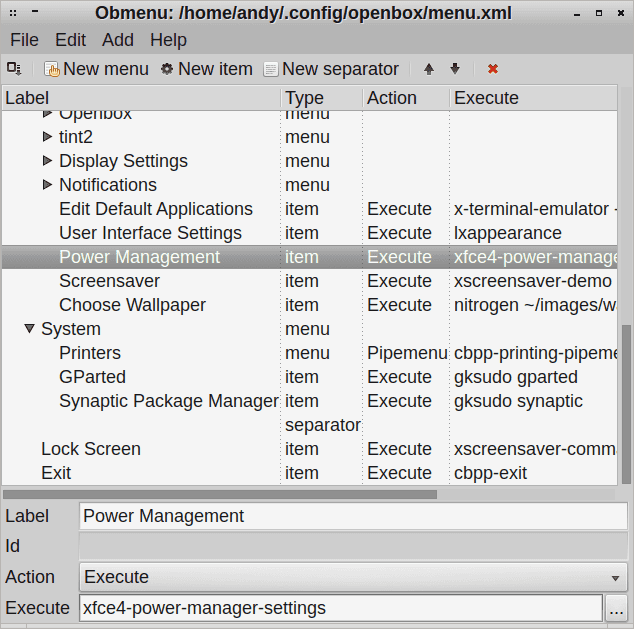
There is an incorrect menu entry for Settings > Power Managment, to fix the menu entry, select Settings > Openbox > GUI Menu Editor and change the Settings > Power Management entry from mate-power-manager to xfce4-power-manager-settings, once done you should select File > Save to ensure the change is persistent.
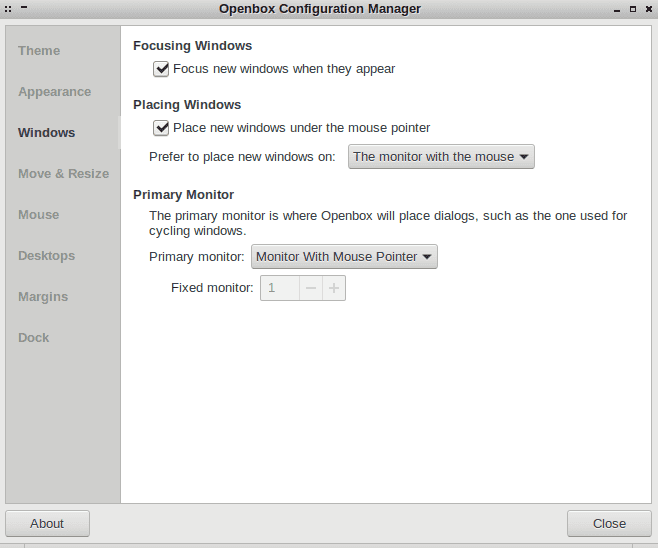
Openbox Configuration Manager
Using multiple monitors I prefer applications to start on the screen I launch them from. This is not fool-proof but is the best I have been able to manage.
Go to Settings > Openbox > Gui Config Tool and on the Windows tab put a tick in the Place new windows under the mouse pointer checkbox. Also you can select your preference in the Prefer to place new windows on and Primary monitor dropdown.
File Manager Previews
In the file manager Thunar, select from the menu Edit > Preferences > Show thumbnails: Always (it defaults to never) and click close.
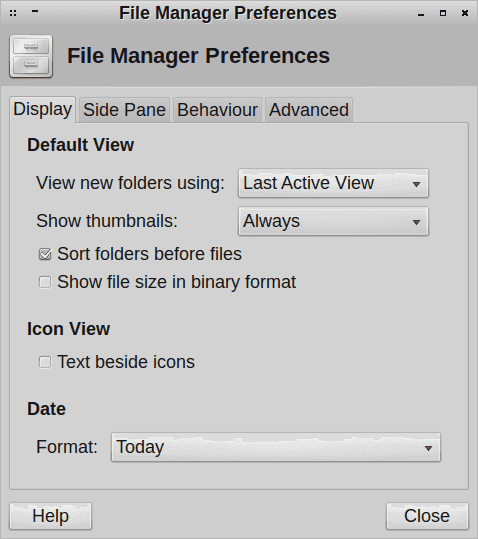
That will fix image and pdf previews, if you would also like video and other media to use preview images you will also need to install an additional package:
$ sudo apt install tumbler-plugins-extraVolume Control
The Super + V key should open the volume control but instead gives the error failed to execute child process "pavucontrol".
To fix this settings > openbox > edit rc.xml then replace pavucontrol with mate-volume-control in the below section <keybind key="W-v">.
    <keybind key="W-v">
      <action name="Execute">
        <startupnotify>
          <enabled>true</enabled>
          <name>Volume</name>
        </startupnotify>
        <command>mate-volume-control</command>
      </action>
I had to reboot before the change took effect.
GIMP font rendering
There are some issues with font rendering when placing white text on a black background. These can be fixed by creating /etc/gimp/2.0/fonts.conf and adding:
<fontconfig>
  <match target="font">
    <edit name="rgba" mode="assign">
      <const>none</const>
    </edit>
  </match>
</fontconfig>
References: