
Ubuntu 14.04 Server with PHP 7.0
Installation
Ubuntu 14.04 Server ships with php 5.5.9-1 and it was desirable for our developers to use a newer version.
Rather than compiling from source we are going to use a backport of php7.0 from Ubuntu 16.04 provided by Ondřej Surý.
$ sudo add-apt-repository ppa:ondrej/phpDue to a current bug if your system locale is set to anything other than UTF-8 we need to use the following workaround to allow us to add the PPA.
$ sudo apt-get install -y language-pack-en-base
$ sudo LC_ALL=en_US.UTF-8 add-apt-repository ppa:ondrej/php
$ sudo apt-get update
Install the php package.
$ sudo apt-get update
$ sudo apt-get install php7.0
Install any php modules your project may need.
$ sudo apt-get install php7.0-mysql php-xml php7.0-zip php-sqlite3 php-mbstring php7.0-curl php7.0-intlThe installation of php7.0-mysql will also remove php5-mysql (which should be noted in case you wish to roll back later).
Testing
We can check and set the version of the php interpreter that is used by the command line.
$ sudo update-alternatives --list php
/usr/bin/php5
/usr/bin/php7.0
We can then set the default command line interpreter using update-alternatives.
$ sudo update-alternatives --set php /usr/bin/php5
$ sudo update-alternatives --set php /usr/bin/php7.0
We can also run a script on a specific version of the php runtime by specifying the interpreter on the command line /path/to/desired/php/interpreter /path/to/your/script.
$ /usr/bin/php5 /home/andy/myscript.phpWe can check the default version of php that is running on the command line as follows.
$ php -v
PHP 7.0.10-2+deb.sury.org~trusty+1 (cli) ( NTS )
Copyright (c) 1997-2016 The PHP Group
Zend Engine v3.0.0, Copyright (c) 1998-2016 Zend Technologies
    with Zend OPcache v7.0.10-2+deb.sury.org~trusty+1, Copyright (c) 1999-2016, by Zend Technologies
We can also check the version of php that is running on the webserver by creating /path/to/webserver/root/info.php.
info.php
<?php
phpinfo();
?>
Modules
You will need to disabled the Apache PHP5 module and enabled the PHP7.0 module.
$ sudo a2dismod php5
$ sudo a2enmod php7.0
$ sudo service apache2 restart
You can test by hitting < your domain>/info.php and you should see the info.php page.
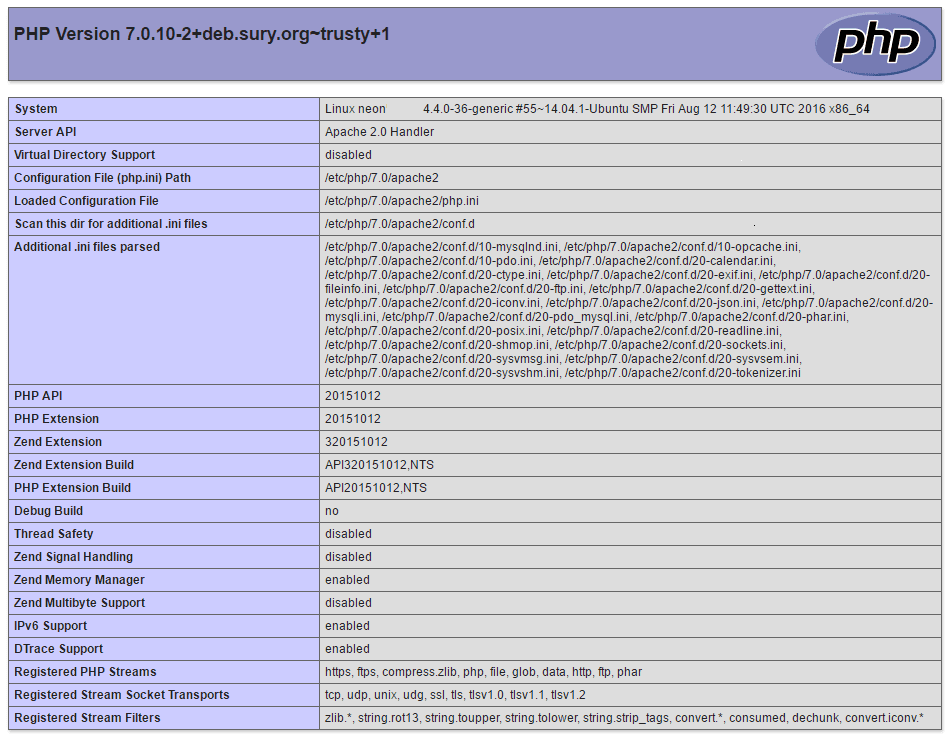
For added security the info.php file should be removed once testing is completed.
$ sudo rm /path/to/webserver/root/info.phpRemoval
If everything goes wrong and you want to remove php7.0 and revert back to the 5.5.9-1 version supplied with Ubuntu 14.04 Server you can perform the following operation.
$ sudo apt-get remove php7.0 php7.0-cliphp7.0-mysql php7.0-common php7.0-json php7.0-opcache \
php7.0-readline php7.0-xml php7.0-zip php-sqlite3 php-mbstring --purge
$ sudo rm /etc/apt/sources.list.d/ondrej-php-trusty.list.save
$ sudo rm /etc/apt/sources.list.d/ondrej-php-trusty.list
$ sudo apt-get update
If you use mysql don't forget to re-install the php5-mysql package.
$ sudo apt-get install php5-mysqlAlso re-enabled php5 Apache module.
$ sudo a2dismod php7.0
$ sudo a2enmod php5
$ sudo service apache2 restart
References